
AI for ticket management: shorter waits, more resolutions
How AI classifies, routes and answers support tickets: existing Zendesk and Freshdesk features, what needs building and verified sources.
Reading time: 10 min
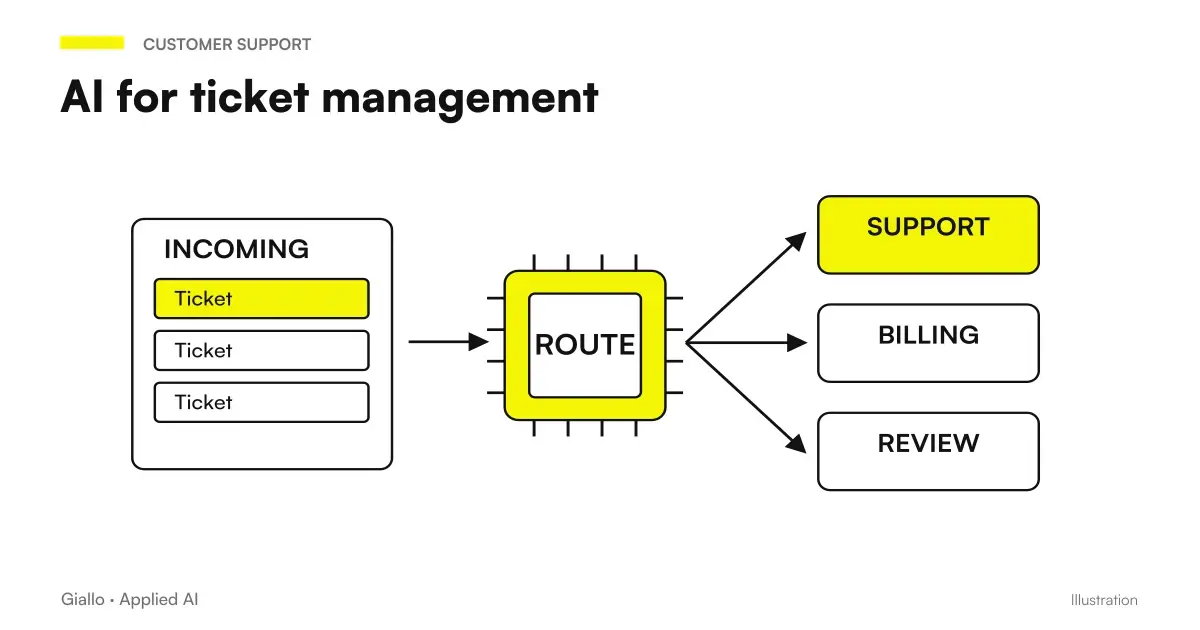
Every open ticket is a customer waiting, and those who wait too often do not wait all the way: write again, call, or leave. For many SMEs the problem is not the quality of the answers, but the fact that the volume during peak hours exceeds what a small team can dispose of.
AI doesn't solve a messy organization. But on a precise part of the job, i.e. classifying, sorting, responding to standard cases and keeping tickets still under control, it reduces the delay in a verifiable way. Here we see where it really intervenes, what is already in the most popular software and what needs to be built instead.
In summary
- The AI intervenes on classification, sorting, first response and monitoring, not about complex or emotional cases.
- If a response starts without human review, the customer is entitled to know that it is generated by a system, by the AI Act.
- The most popular ticketing systems already have AI functions included in some plans: it must be verified before integrating a new one.
- You need a contract with the supplier under the Article 28 of the GDPR, not just a good configuration.
- The system is trained on the historical: the quality of the previous data matters more than the quantity.
The stages of a ticket, and where AI really is needed
A ticket goes from precise stages, from reception to closure. The AI can intervene in each with a different level of autonomy.
| Phase | What AI does | Who Decides |
|---|---|---|
| Receiving | Read text, assign category and priority | The system |
| Sorting | Route to the right team or operator | The system, on configured rules |
| First Answer | Responds alone or prepares a draft | Depends on the category |
| Resolution | Proposes a solution from similar cases | The Valid Operator |
| Follow-up | Remember unanswered tickets | The system |
| Closure | Collect feedback, update knowledge base | The system |
In the reception, sorting and follow-up stages automation is almost always reliable. In response and resolution it depends on the category of the ticket, and for complex or emotionally charged cases the AI only prepares the context for the responder.
How the system learns to classify on its own
Classifying a ticket by hand, each time, is one of the most repetitive and least useful jobs for those who work in the support. AI does this by reading the text and recognizing some signals: intent (claim, information, malfunction, commercial request), the product or service involved, clues of urgency in the language, the channel of provenance.
The system trains on the history of already solved tickets: the more correct examples it receives, the more precise the next classification is. For very specific technical domains, such as industry software or machinery, it is advisable to provide for a period of human supervision at the beginning, to correct errors before they become the norm learned by the system.
An aspect that should be decided immediately: some keywords, such as legal references or threats of cancellation, should always force a rapid human review, regardless of the category assigned automatically.
When the ticket opens an indentation practice
A return request requires data and status of its own, even if it comes in the support queue. Return Management and RMA with AI distinguishes article, quantity, declared reason and relevant policy. The ticket can prepare the connection, while authorization to return, control of the goods and reimbursement follow the planned route.
When the answer starts by itself, and when it waits for the operator
He can answer for himself
- Frequently Asked Questions with Standard Answer
- Status requests, with access to management software
- Self-service operations, such as password reset
- Confirmation of reception outside working hours
Only prepare draft
- Formal Complaints
- Non-standard technical requests
- Customers with problematic history
- Any case that requires a decision, such as a refund
Classification and customer response can remain two distinct steps: the guide to JEV for assistance and ticket design categories, review and take charge before subsequent actions.
The level of autonomy is established by category, not ticket per ticket: once the rules are defined, the system applies them consistently, and the operator can always intervene by hand. The perimeter matters more than speed: better a "I can't help you on this, I'll hand you an operator" than a made-up answer.
The AI module inside the ticketing software you already use
Before integrating something new, it is worth checking what the current subscription already includes.
Zendesk has a suite of functions collected under the name Zendesk AI: AI agents that handle requests across multiple channels, a Copilot that assists the operator in responding, and automatic quality assessment tools. Availability depends on the subscribed plan: check which functions are included in yours.
Freshdesk it organizes its AI functions under the Freddy AI brand, with three distinct components: an agent who responds autonomously, a Copilot who assists those who work on the ticket, and an analysis module. Here, too, the availability varies by plan.
For less widespread systems or customized management software, or when a logic is needed that the ready software does not offer, integration is built via API, connecting tickets to an AI model through tools such as Make or n8n. It is a more flexible but also longer project.
The assumption in any case is the same: tickets must be in a structured system. If today they arrive as emails scattered in a shared box, the first step is not AI, it is to put up a basic ticketing, as explained in the practical guide to AI for SMEs.
The automatic response and the obligation to say it
If an answer starts without an operator reviewing it, it is no longer just a question of text quality. The Article 50 of the AI Act It requires those who provide an AI system that interacts with people to let them know that they are receiving a response from an automatic system, unless it is already evident from the context. The obligation shall apply from 2 August 2026, as a result of Article 113 of that Regulation.
In practice, this concerns full-autonomous responses (first column of the previous section), not the drafts that an operator revises and signs with his own name: in that case a person remains to answer.
Putting the system on its own history
- Export and analyze the historian. A few months of resolved tickets are enough to see the most frequent categories and those with the longest response times.
- Label a correct sample by hand. It is the material on which classification is configured: few correct data is worth more than many inconsistent data.
- Define the sorting rules, including exceptions: customers with dedicated treatment, keywords that require immediate supervision.
- Write or update the knowledge base. A lackluster knowledge base produces inaccurate responses, better a tight and correct perimeter.
- Start in proposal-only mode. The system suggests, the operator approves or corrects, and each fix improves the model.
- Enable Category-by-Category Autonomy, starting with those at lower risk, and only widens after verifying the numbers.
What to watch for if it's working
Indicator names matter less than knowing what to compare them with: your previous trend, not an industry average that doesn't know your mix of requests.
| Indicator | What it says | What to Compare It With |
|---|---|---|
| Time to first response | How long the customer waits before hearing something | The Average Time Before AI |
| Resolution Time | How long the entire ticket lasts, from opening to closing | The same period, before and after |
| Resolution on first contact | Ticket closed without the customer having to return to write | His own historian |
| Escalation rate | Share of tickets passed to an operator | It should be monitored for anomalies, not reset |
An escalation rate that drops too fast is not necessarily a good sign: it can mean that the system handles cases on its own that it should pass. It is worth periodically sampling the automatic responses and actually reading them, with the same criterion described in AI for Business Customer Care About the autonomy perimeter.
A dispute requires accountability and escalation
The general classification becomes more delicate when the customer disputes a fact or asks for an economic outcome. customer complaints with AI the tab distinguishes stated facts, evidence, request and history. The priority follows legible criteria and each escalation comes to a referent, with a draft that does not create unauthorized commitments.
Two different queues, two ways to start
Think of a small technical team that receives a mixture of bug reports, access requests, and repeated usage questions every day. In such a case, the first sensible intervention is to separate the questions of use, the ones to which the documentation already answers, from the rest: they are the lowest risk category and the one with the most immediate return, while the critical bugs remain reported to a human with high priority.
Instead, think of an after-sales service where most tickets are about the status of a shipment or return. Here the direct link to management software matters more than sophisticated classification: a correct answer with real-time updated data is worth more than a well-written but generic answer. Real complaints, those with a disgruntled customer, still remain to whom an exception can be decided.
In both cases the question that decides where to start is the same: which category has the highest volume and the lowest risk if AI is wrong.
Where a project of this type breaks down
Activate everything together. The temptation is to configure the automatic response on each category from the first day. The system is not yet calibrated on the specific context, and limit cases find them customers.
No escalation rules. A system that doesn't know when to stop responds sooner or later to a case that it shouldn't handle on its own.
Knowledge base not updated. Old procedures or outdated prices produce wrong answers, which weigh more than no answers.
Ignore the contract with the supplier. A provider who processes ticket data on your behalf must be bound by an agreement under Article 28 of the GDPR, as described in GDPR and artificial intelligence in the company: it is not an administrative detail.
Never look at the rate of escalation. Too high or too low, both signal something that needs to be verified, not ignored.
Which queue to start with
The practical starting point is not the most sophisticated system available, but the queue where the volume is high and the error costs little if it happens. If you already use Zendesk or Freshdesk, check first to include your plan: often classification and suggested response are already there, and are only needed to configure.
For the more technical part, such as access to management software or flows connecting multiple systems, the work requires a dedicated project: the process automation services by Giallo Studio start from a history analysis, not a pre-packaged package. To complete the picture on the assistance side, AI for Business Customer Care covers the upstream part of the ticket, while AI for automatic follow-up It covers what happens after a ticket appears to be closed but the customer has not responded.
Giallo Studio guides: methodology and sources
How we apply it in the company
Related resources
 AI for Business Customer Care: How It Really Works
 AI to Respond to Business Emails: How It Works
 AI follow-ups: keep track of every contact
 AI for SMEs: a practical guide to really getting started
 GDPR and artificial intelligence in the company
 AI for car workshops: quotes, appointments and customers
 AI for dentists and dental practices: recalls, quotes and scheduling
 AI for notaries and notarial firms: case files, documents and clients
AI by sector
The same reasoning, applied to the other areas we follow.
- AI for Business Functions: Where to Start
- AI for gardeners and grounds maintenance: quotes and customers
- AI for photographers: requests, selection of shots, galleries and image rights
- AI for hotels: booking, guest requests and automated reviews
- AI for internal business training
- AI for plumbers: quotes, on-site jobs and customers
- AI follow-ups: keep track of every contact
- AI for estate agencies: leads, viewings, listings and documents
- AI for physiotherapists: bookings, reminders and patients
- AI for business knowledge bases: find the information you need
- AI and e-invoicing: what can be automated
- AI for Logistics and Shipping
FAQ
Can AI answer a ticket independently, without anyone reviewing it?
Yes, for standard tickets such as frequently asked questions or status requests. If the reply is sent without human review, the customer is entitled to know that he has received an answer generated by an automatic system: it is one of the situations covered by the transparency obligation of the AI Act.
How does the AI figure out what kind of ticket it is?
It reads the text and recognizes the intent (complaint, information, malfunction), the product involved and clues of urgency in the language used. The more tickets already correctly classified it receives as an example, the more precise the subsequent classification is.
Do I need to change ticketing software to have AI?
Often no. Most popular systems already have artificial intelligence functions included in some plans: it is better to check what your subscription includes before evaluating an external integration.
Can ticket data be processed by an external AI provider?
Yes, but Article 28 of the GDPR requires a contract between the data controller and data processor, along with an updated privacy notice stating that an automated system is used. The software’s technical configuration alone is not enough.
What happens if the system misclassifies an urgent ticket?
It depends on how the escalation rules are set: critical keywords or customer profiles at risk should still force a rapid human review, regardless of the category assigned by the system. It is a check to be tested before launch, not to be discovered after.
How many historical tickets are needed to classify new ones well?
There is no fixed threshold: it depends on how many distinct categories you handle and how similar they are to each other. A broad sample that has already been corrected manually is worth more than a large but inconsistent one.